


Meal Planner & Recipe Keeper
4.5962.00 Reviews
App Specs
- Version
- 1.4.111
- Updated On
- License
- Free
- Downloads
- 500,000+
- Developer
- Stashcook
- Categories
- Food & Drink
- Platform
- Android, iOS
Screenshots

 Analysis by AppCompare
We've all been there—staring into the fridge, hoping for dinner inspiration to magically appear. Enter Meal Planner & Recipe Keeper, the app that promises to transform your culinary chaos into organized bliss. I’ve been using it for a few weeks now, and here's how it fared in my kitchen escapade.
Getting Started with Meal Planner & Recipe Keeper
Diving into Meal Planner & Recipe Keeper is like having a personal sous-chef at your fingertips. Setting up is a breeze. You create an account and are immediately greeted with a sleek, intuitive interface that’s easy on the eyes. The layout is clean, with a minimalist design that makes navigation a no-brainer. It’s almost as if the app is saying, "Hey, relax. I got this."
Upon opening, you’re presented with options to explore recipes, plan meals, create shopping lists, and even track pantry items. The app offers a brief tutorial, but honestly, you won’t need it. Everything is straightforward, making it perfect for those who, like me, appreciate simplicity combined with functionality.
Recipe Exploration and Customization
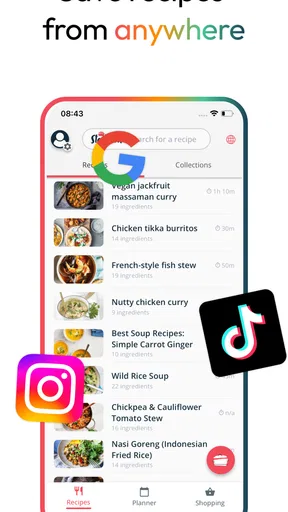
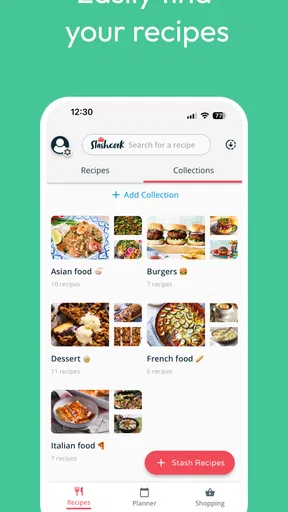
The recipe library is where the magic happens. The app boasts a vast collection of recipes from around the globe, and I found myself lost in a culinary wonderland. You can search recipes by ingredients, cuisine, or dietary preferences, making it easy to find something that fits your lifestyle or cravings.
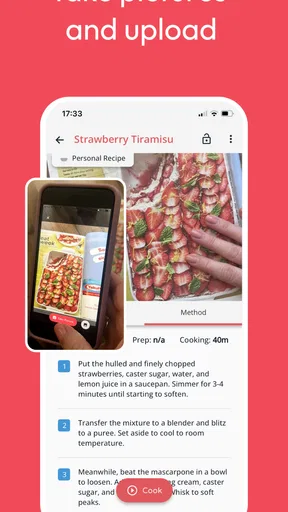
One feature that stood out is the ability to customize recipes. You can tweak ingredients, adjust serving sizes, and even add personal notes. It’s like having a digital recipe book that adapts to your every whim. Plus, if you’ve got Grandma’s secret stew recipe scribbled on a napkin, you can easily input it into the app, ensuring it’s never misplaced again.
Meal Planning Made Easy
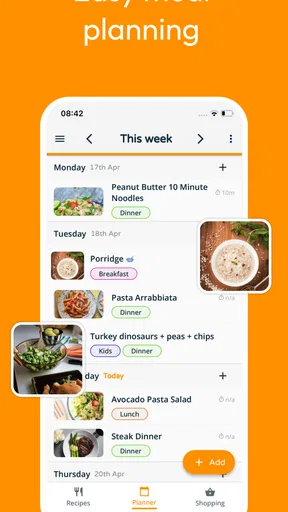
Now, onto the meal planning feature—arguably the heart of this app. The calendar view allows you to plan meals for the week or month, giving you a bird’s-eye view of your culinary roadmap. Drag and drop your chosen recipes into specific days, and voila! Dinner dilemmas are a thing of the past.
The app also syncs with your calendar, so you can keep track of meals alongside other commitments. It’s a nifty feature for those juggling busy schedules, helping to ensure you're not double-booked for dinner and dance class. And if you’re like me, who tends to forget what’s planned, the app sends friendly reminders of upcoming meals.
Worth Reading Before You Choose

EA SPORTS FC Mobile 26 Is a Bigger Football Game, but It Takes Time

Flipboard Shows What News Apps Must Do Beyond the Feed

Switching to Android Auto Means Rethinking Your Driving Routine

Google Calendar Makes a Crowded Week Easier to Manage

Ludo King Makes the Most of the Minutes Between Plans

Baby Panda World Brings Quick Play to Modern Phones, but Its Game Library Feels Busy
Shopping List and Pantry Management
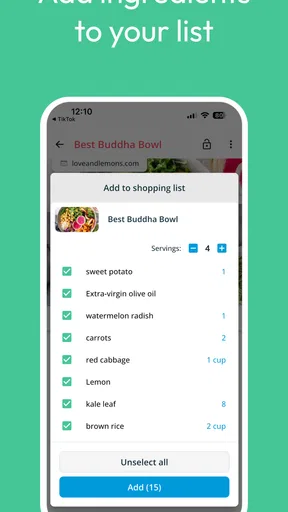
Creating a shopping list is as easy as pie—quite literally! With a click, ingredients from your planned meals are added to a list, categorized by aisle for efficient shopping. You can manually add items too, making it a one-stop shop for all grocery needs.
Moreover, the pantry feature is a game-changer. It allows you to keep track of what you have, minimizing food waste. You can update quantities, mark items as "used," and even set expiration reminders. It’s incredibly satisfying to know exactly what's stocked at home, helping to save money and reduce waste.
Final Thoughts
In a world where time is a precious commodity, Meal Planner & Recipe Keeper offers a breath of fresh air. It simplifies meal planning, reduces grocery trips, and makes cooking a joy rather than a chore. Whether you’re a kitchen novice or a seasoned chef, this app caters to all, providing the tools needed to conquer culinary chaos.
So, if you're someone looking to streamline your meal prep and enhance your cooking experience, give Meal Planner & Recipe Keeper a whirl. It might just become your new kitchen best friend, turning meal times into a delightful adventure.
Pros
- User-friendly interface
- easy navigation.
- Wide variety of recipes available.
- Customizable meal plans for dietary needs.
- Syncs across multiple devices seamlessly.
- In-app grocery list feature is convenient.
Cons
- Limited offline access to recipes.
- Requires account for full features.
- Some features hidden behind paywall.
- Occasional ads can be intrusive.
- No integration with fitness apps.
FAQs for Meal Planner & Recipe Keeper
What features does Meal Planner & Recipe Keeper offer?
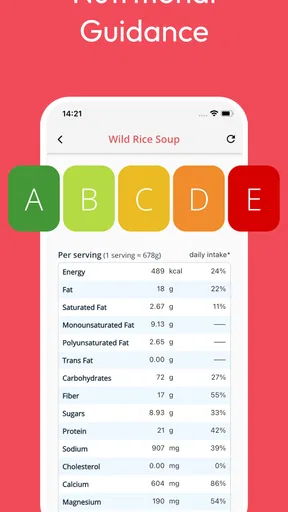
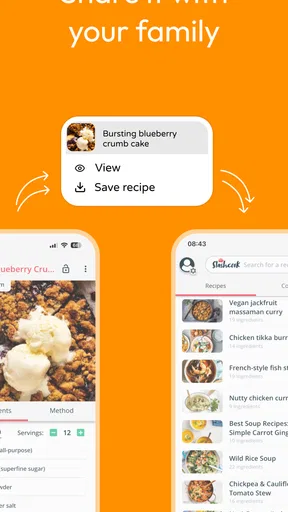
Meal Planner & Recipe Keeper provides a comprehensive suite of features, including customizable meal plans, a vast recipe database, grocery list creation, and nutritional tracking. Users can import recipes from the web, categorize them, and even share their favorites with friends and family. It's designed to simplify meal preparation and enhance your culinary experience.
Is Meal Planner & Recipe Keeper available on both Android and iOS?
Yes, Meal Planner & Recipe Keeper is available for download on both Android and iOS platforms. This ensures that users can access and sync their meal plans and recipes across multiple devices, providing flexibility and convenience whether you're at home or on the go.
Does the app require an internet connection to function?
Meal Planner & Recipe Keeper can function without an internet connection for most of its features. However, to import new recipes from the web or sync data across devices, an internet connection will be necessary. Offline capabilities ensure you can access your saved recipes and meal plans anytime.
Are there any subscription fees or in-app purchases?
The app may offer a free version with basic features, but to unlock premium features like advanced meal planning tools, ad-free usage, and additional recipe storage, a subscription or one-time purchase might be required. Pricing and features can vary, so it's advisable to check the app store listing for details.
How user-friendly is the interface of Meal Planner & Recipe Keeper?
The app is designed with user-friendliness in mind, featuring an intuitive interface that is easy to navigate. Whether you're a tech-savvy individual or a beginner, you'll find the layout simple and efficient, allowing for quick access to your meal plans, shopping lists, and recipes without hassle.


